
What It Is & How to Start in 2026
Affiliate marketing is still one of the simplest ways to make money online.
You recommend products you genuinely rate. When someone buys through your link, you get a commission. You don’t have to make the product, hold stock, handle shipping, or deal with refunds.
In this guide, I’ll show you how to think about affiliate marketing in 2026, what still works, what has changed, and how to start without building the kind of site Google or readers can easily ignore.
What is affiliate marketing?
Affiliate marketing is when you promote another company’s product or service. If someone buys through your link, you earn a commission.
For example, Serious Eats earns a commission when you click through to any of these links and make a purchase.
So if you clicked through and bought their top pick, the $69 Yosukata carbon steel wok, on Amazon, Serious Eats would earn about $3.10 at Amazon’s standard 4.5% rate for kitchen products.
It doesn’t sound like much. But multiply that by thousands of readers a month, across hundreds of recommendations, and it adds up.
Not every program pays like Amazon either. Software companies often pay much more per sale. For example, Shopify pays up to $150 for every new paying merchant you refer.
How does affiliate marketing work?
There are usually three or four parties involved:
- The merchant: the company selling the product (e.g., Amazon, Shopify, HubSpot).
- The affiliate: you, the person recommending the product.
- The customer: the person who clicks your link and buys.
- The affiliate network (sometimes): a middleman like Awin, Impact, CJ, or Rakuten that handles tracking and payments for lots of merchants at once. Some merchants, like Amazon, run their programs in-house.
When you join an affiliate program, you get a unique link containing a tracking ID. This tells the merchant that a visitor came from you.
When someone clicks your link, the merchant stores a small file called a cookie on their device. The cookie has an expiry date (the “cookie duration”), so you still get credit if they don’t buy right away.
For example, here’s how it works if you’re an Amazon affiliate:
- Someone reads your post on the best winter jackets.
- They click your Amazon link for one of your recommendations.
- They get distracted and close the tab.
- They come back to Amazon later that day and buy the jacket.
Because the purchase happened within Amazon’s cookie window, you earn a commission.
Amazon’s cookie only lasts 24 hours, though. However, if the customer adds the item to their cart during this window, the window extends. You’ll still earn a referral commission as long as the order is placed before the cart expires, usually up to 90 days.
Other affiliate programs could be more straightforward and generous, giving you a cookie window up to 30, 90, or even 180 days.
Affiliate programs usually pay in one of these ways:
- Percentage of the sale: e.g., Amazon pays 1–10% depending on the category.
- Flat fee per sale: e.g., Bluehost pays $65 per qualified hosting sale.
- Recurring commission: e.g., HubSpot pays 30% of a customer’s subscription for up to a year.
- Pay per lead or sign-up: you get paid when someone signs up for a trial or fills in a form, even if they don’t buy straight away.
In affiliate marketing, two conversions need to happen for you to get paid.
First, the reader has to click your link. You control that. Second, they have to buy on the merchant’s site. You don’t control that. The merchant owns the product, the price, the checkout, and the program terms. That’s why choosing the right merchants matters so much (more on that later).
How much money do affiliate marketers make?
It varies hugely. But here are some benchmarks.
But look closer, and the picture changes:
- Affiliates with less than one year of experience earn an average of just $636 per month.
- Affiliates with 1–2 years of experience earn an average of $4,196 per month.
- Affiliates with 3+ years of experience earn roughly 9x more than beginners.
Keep in mind these are averages. A handful of very successful affiliates pull the numbers up, so the typical affiliate earns less than this.
For example, take Random Olive, a craft and hobby blog that publishes its income every month. In August 2026, it earned $2,568 in affiliate commissions, mostly from TikTok Shop ($1,274) and Amazon ($1,218).
In September 2026, that dropped to $1,915. That’s a nice side income, and it shows two things: affiliate income often comes from several programs at once, and it can swing quite a bit from month to month.
So don’t expect to be successful right away. If you’re just starting out, your first checks might look more like this for a while:
Affiliate earnings calculator
Use this calculator to see how much you could potentially earn on your affiliate site.
Is affiliate marketing still worth starting?
But “worth it” depends on how you plan to do it.
The market is still growing
According to the PMA 2025 US Performance Marketing Study, US affiliate marketing spend grew from $9.1 billion in 2021 to $13.62 billion in 2024. In fact, that spending generated an estimated $113 billion in ecommerce sales. Merchants are still putting real money into affiliate programs.
That said, industry growth does not automatically mean a beginner can throw up a review site and make money. Some of that spend goes to cashback sites, loyalty programs, tech partners, large publishers, and creators.
So a growing market is good news, just not a personal income forecast.
Big publishers are still growing affiliate referral revenue
Large media companies are still investing in affiliate content, and many are growing it:
- Wirecutter (The New York Times): Affiliate referral revenue grew by $3.9 million year over year in the first six months of 2026, according to the company’s Q2 2026 10-Q filing.
- People Inc. (formerly Dotdash Meredith): Performance marketing revenue grew 13% year over year in Q2 2026, “driven by 11% affiliate commerce growth,” according to its Q2 2026 earnings release.
- Condé Nast: Commerce revenue grew 13% in 2025, according to CEO Roger Lynch’s annual memo.
Not every big publisher is growing, though. Future plc (which owns sites like Tom’s Guide and TechRadar) saw its affiliate revenue fall 24% in its most recent half-year, which it blamed on lower search audiences. Ziff Davis’s tech and shopping division is shrinking too.
Notice the pattern. The publishers that are growing have strong brands that people visit directly. The ones that are struggling rely more heavily on Google traffic. We’ll come back to this.
Independent affiliate websites are doing well too
You’ve probably heard stories of affiliate sites decimated by Google’s Helpful Content Update. Those stories are real. But plenty of independent publishers have recovered, and some are bigger than ever.
- HouseFresh, the air purifier review site, lost about 95% of its Google traffic after the 2023 update. By October 2025, it was back to pre-update levels, helped in part by building a YouTube channel.
- That Fit Friend went from around 100,000 monthly search visits to almost nothing in mid-2024, then recovered to well above where it started.
- Treeline Review, an independent outdoor gear site, now gets an estimated 60%+ more search traffic than it did before the update.
Then there’s iRunFar, which has survived every Google update. Its estimated search traffic has roughly tripled since early 2023. Watch the interview with its founder on our YouTube channel:
The big risk: depending too much on search
Look at the chart above again. Even sites that did everything right saw their traffic collapse almost overnight before recovering. Not every site recovers.
There’s a reason for this. Google seems increasingly unwilling to reward websites that exist only to capture search traffic and pass it on to a merchant. If your site adds nothing beyond what the merchant’s own product page says, Google has little reason to send people to you rather than straight to the merchant.
Do you have an existing or intended audience for your business or site that would find the content useful if they came directly to you?
There’s another reason to be cautious too. Google is answering more questions directly in search results. For example, our study found that the presence of an AI Overview now correlates with a 58% lower average clickthrough rate for the top-ranking page.
So the goal in 2026 is not to be a clever arbitrage of Google’s traffic. It’s to become a destination: a brand people seek out by name, subscribe to, watch, and come back to. Search can still be a big part of how people find you. It just shouldn’t be the only reason you exist.
How to get started with affiliate marketing
A lot of affiliate guides start with the platform: should you start a blog, a YouTube channel, or a TikTok account?
That matters, but it shouldn’t be your first decision. Your first decision is what you’re going to talk about.
Here are the seven steps to follow:
1. Pick your niche
Your niche is the main topic your site or channel covers.
A good niche scores well on these four criteria:
- Competition. Choose your battles wisely. As a solo creator, you’re not going to outrank Wirecutter or Good Housekeeping on “best vacuum cleaner.” Pick a space where you have a realistic chance.
- Commercial value. Look for lots of searches like “best ,” “ vs ,” and “ review.” These people are comparing options because they’re about to buy.
- Breadth. There needs to be enough to talk about. A site about pulled pork sandwiches would run out of topics within a month. A site about food is too broad to tackle. Smoking meats is about right: plenty to cover, with room to expand later.
- Personal interest. Affiliate marketing is a long game. If you don’t genuinely care about the topic, you’ll struggle to keep going when results are slow.
Watch this video to learn more:
Start with what you’re interested in
You saw earlier that affiliate marketers with >3 years of experience make the most money.
But in order to last at least three years, you need to work on something that you care about. Otherwise, you’ll give up at the slightest obstacle.
Of the four criteria, personal interest is the easiest place to begin.
For example, I probably couldn’t build a useful gardening site because I know nothing about gardening. But I could build one about breakdancing, which I’ve done for more than 10 years. (Which was what I did years ago.)
If you’re not sure where to start, ask yourself:
- What am I good at?
- What do I like doing (enough to make content about it for years)?
- What do other people ask me for advice on?
Check the landscape
Next, plug each idea into Keywords Explorer. You’re not looking for a keyword to rank for yet. You’re trying to understand the overall landscape and see how well it matches against the four criteria.
For example, let’s imagine that one of my favorite weekend hobbies is hiking. So, that’s personal interest taken care of. So, I’ll enter the keyword “hiking”:
Lots of search volume, a sign of an established niche. If we click through to the Matching terms report, we see tons of keywords, which is a great sign of breadth.
Now, let’s add a filter for “best” keywords to see if there’s any commercial intent in the niche. Another great sign as we see tons of keywords (28,000+) and a high search volume (~580K).
But a KD of 61 for the overall topic seems to be on the challenging side. Do we have a potential opening into this niche? We can find out by setting a KD filter (of say 20) to find keywords with low difficulty.
There are still >3,700 keywords to target. Pretty good!
Make sure you can earn commissions from it
Specifically for affiliate marketing, you’ll want to make one extra check. Commercial searches alone aren’t enough. People also need to be buying things you can earn a commission on.
For example, let’s say you’re targeting the niche “best restaurants in New England”. It’s a great niche that fulfills all four criteria. However, there’s one major problem: most restaurants don’t have affiliate programs.
So if you’re building an affiliate site, make sure the products you’re going to recommend have affiliate programs before you commit.
2. Find affiliate programs to join
Broadly speaking, there are three types of affiliate programs:
- High-paying, low-volume. Niche products with fewer buyers but big payouts. These are usually software or B2B products. For example, HubSpot sells only to businesses, but its affiliate program pays 30% recurring commission for up to a year.
- Low-paying, high-volume. Products with mass appeal, but low commission rates. For example, Amazon Associates pays only 1–10%, depending on the category. But almost everyone shops on Amazon, so it converts well.
- High-paying, high-volume. Expensive products with mass appeal, like credit cards, insurance, VPNs, or web hosting. These programs pay well, which is exactly why they’re the most competitive. You’ll be up against affiliates with deep pockets and years of experience.
Which one should you join? It depends on who you’re helping.
If you’re targeting consumers, start with low-paying, high-volume programs like Amazon or big retailers. They’re easy to join and convert well. If you’re targeting businesses, go for high-paying, low-volume programs like software. I’d avoid high-paying, high-volume programs like credit cards as a beginner, unless you have real expertise in that space.
You’ll also come across affiliate networks. These are marketplaces where thousands of merchants list their programs, so you can join many through a single account. The big ones are Awin, Impact, CJ, and Rakuten Advertising. For software, PartnerStack is popular.
If you don’t want to apply to individual programs at all, tools like Skimlinks automatically turn your product links into affiliate links across thousands of merchants, in exchange for a cut of your commissions (Skimlinks keeps 25%).
How to find affiliate programs
The easiest way is to search Google for “[brand name] affiliate program.” Most companies with a program have a dedicated page for it.
Another way is to see which programs other affiliates in your niche promote. Just enter a competing affiliate site into Ahrefs’ Site Explorer and go to the Linked domains report. This shows which websites it links to most. Many of these will be merchants it’s an affiliate for.
For example, when I look at the report for Pat Flynn’s SmartPassiveIncome site, I see that he has linked to Kit a total of 364 times.
So many links to a tool is a sign that Pat Flynn either owns the tool or is an affiliate. In this case, he’s an affiliate.
If there’s a product you’d like to promote but it doesn’t have a public affiliate program, reach out to the company and ask. Many brands are happy to set up a deal with a creator who has a relevant audience.
How to choose a good program
A high commission does not make a product worth recommending. If the offer doesn’t fit your audience, doesn’t convert, or isn’t something you’d feel good recommending, it’s still a bad offer.
Start with the commission structure, because this is where beginners usually get stuck:
- Percentage vs. flat fee. Percentage commissions work in your favor when people buy expensive items or fill up their carts. Flat fees are more predictable, and are usually better for low-priced products or subscriptions with cheap entry plans. A good rule of thumb: work out what you’d actually earn per sale on a typical order, not the headline rate. 10% of a $20 product is $2. A $65 flat fee is $65.
- One-time vs. recurring. Recurring commissions are great for subscription products, because one referral keeps paying you every month. But they only pay off if customers stick around. If you’re promoting a tool people try for a month and cancel, a bigger one-time payout is usually the better deal. Many programs also cap recurring payments at 12 months, so check how long they last.
- Cookie duration. The longer the cookie, the more time people have to decide and still credit you. This matters most for expensive, considered purchases, like software, mattresses, or cameras. For cheap impulse buys, a short cookie like Amazon’s 24 hours matters less.
Then, before you commit, run through this checklist:
- Does the product fit your audience? If you’re targeting solopreneurs but you keep pushing expensive enterprise tools, the commission rate won’t save you.
- Can you explain it honestly? You should know who it’s for, who should skip it, what the trade-offs are, and how it compares with sensible alternatives. If you can’t, it’s probably not a good product for you to lead with.
- Does the merchant convert? You only control the click. A confusing product page, weak pricing, a clunky checkout, or no shipping to your readers’ country can kill your sales. Look for public income reports (search for “income report [program name]”) to see if other affiliates are earning from it. Or sign up and ask the affiliate manager for average conversion rates and earnings per click.
- Do your sales actually get credited? Check the attribution rules. Most programs credit the last affiliate link clicked, so a coupon site or browser extension can sometimes “steal” your sale at checkout. That’s what PayPal’s Honey extension was accused of in 2024, which led to lawsuits and a Chrome Web Store policy change.
- Are refunds and reversals high? A dashboard full of commissions looks nice until half of them get reversed. If a product has lots of cancellations, the headline numbers will mislead you.
- Is the merchant reliable? Look for clear terms, on-time payments, decent support, and a history of keeping the program running.
And always ask yourself one uncomfortable question: What happens if this merchant cuts commissions next month?
It happens more than you’d think. In 2026, Amazon quietly cut commission rates by as much as 50% for many of the large publishers on negotiated rates. If one affiliate program makes up most of your income, that’s a risk you should be aware of. Spread your recommendations across several merchants where you can.
3. Pick a channel that fits how people choose
For most beginners, there are two common ways to do affiliate marketing today:
- Publish useful product content people can find through search
- Show products in use on YouTube or social media
You can also combine them. Many of the most successful affiliate publishers do both.
Publish useful product content people can find through search
This works best when buyers actively research before purchasing. Examples of such keywords are “best trail running shoes for wide feet,” “best air purifier for pet hair,” or “notion alternatives for agencies.”
These are the kinds of searches you found in Step 1, and they’re where detailed comparisons, testing, and explanations can still help.
The goal is not to publish as many buyers’ guides as possible, but to make your most important ones the best in the niche. For example, iRunFar publishes only a handful of buyers’ guides. But it makes sure these guides are consistently updated and the best in the business.
Show products in use on YouTube or social media
This works best when the product benefits from being seen in action, like skincare, audio gear, food, and fashion. Video is especially useful when trust depends on seeing how someone actually uses the product, what they like, and what annoys them.
For example, Fallow reviews pans by cooking on them in their restaurant kitchens:
4. Create great content using your unfair advantage
In the past, many affiliate marketers chose products purely for their commissions and published review after review. Often, they knew little about the niche and had never used the products they recommended.
As more people copied this playbook, search results filled up with unhelpful reviews. Google clamped down, but it didn’t say affiliate content had no place in search. Its guidance shows what it wants instead: original reviews based on real experience, testing, and useful comparisons.
In other words, you now need to build a brand and create genuinely helpful content. That means giving readers a reason to trust you over everyone else covering the same products: an unfair advantage.
You picked a niche you know and care about, which is a good start. Here are five ways to turn that into an advantage:
Develop a unique testing methodology
Lots of affiliate sites claim they “tested” the products they recommend. Far fewer explain how. A clear, repeatable testing methodology, especially one nobody else in your niche uses, makes your recommendations much harder to copy and much easier to trust.
A good example is HouseFresh’s air purifier testing methodology. They explain the specific work they do: which tests they run, the conditions, what they measure, and how they compare products. A reader can inspect the process instead of just accepting a vague claim that the products were “reviewed.”
The point is not simply to say you tested something. The point is to show the deep and hard work that went into testing it. As if you were an inspector and trying to see if a product passed the ISO9000 requirements.
Show products in action
Plenty of reviews are written at a desk. The running shoe gets a few laps around the block, the tent gets pitched in the backyard, and the pan gets one omelette.
But products aren’t designed for those conditions. A running shoe is made to carry you through mile 20 of a marathon. A tent is made to stay up in the wind and rain. A pan is made to survive a busy dinner service. That’s where the real differences between products show up, so that’s where you should test them.
A good example is DC Rainmaker’s Garmin Forerunner 970 in-depth review. Over nearly a month, he used the watch for 50 km runs, trail runs, interval sessions, a half-marathon-length run in summer heat, mountain bike rides, open-water swims, and a four-hour hike. He even wore other watches on his other wrist to compare their accuracy.
You can do this in any niche:
- Wear the running shoes in an actual race, not just on a treadmill
- Take the tent camping in bad weather, not just to the backyard
- Cook a full meal for a crowd, not just a single test dish
- Use the software for a real client project, not just the free trial demo
Then tell readers exactly where and how you used the product. “I ran the Berlin Marathon in these” is far more convincing than “I tested these shoes extensively.”
Collect data nobody else has
Testing tells readers how one product performs. Data tells them how it compares with everything else on the market.
For example, RTINGS doesn’t just review monitors one by one. It has measured more than 400 of them the same way, so you can sort and filter every model by things like brightness or input lag in a single results table.
You don’t need a lab to do this. Depending on your niche, you could track:
- Prices over time, so readers know when a deal is actually a deal
- Shipping times and customer service experiences across retailers
- Ingredients or materials across every product in a category
- Specs compiled into one sortable comparison table
- Reader-submitted results, like how many miles people get from a shoe
The more products and the longer you track, the harder it is for anyone else to catch up.
Get access other people can’t
Most affiliates are working from the same information: the product page, the press release, and everyone else’s reviews. If you can get information they can’t, your content is different by default.
For example, TopJaw got its start by interviewing famous chefs on where they eat in London. Anyone can write a list of the best restaurants in London. Very few people can get Marcus Wareing to tell them his favorites.
TopJaw with celebrity chef Marcus Wareing
The Strategist frequently builds recommendations by interviewing people with relevant experience: chefs, dermatologists, designers, cleaners, and other specialists.
You don’t need celebrity contacts to do this. In most niches, you could:
- Ask professionals who use the product every day what they’d buy, like a physio on running shoes or an electrician on power tools
- Interview people with specific needs, like parents of twins on strollers or people with back pain on office chairs
- Get your hands on products that are hard to find, region-locked, or not yet widely available
- Join beta programs and early-access lists to cover updates before everyone else
Access is hard to scale, which is exactly why it’s valuable. Every interview is something your competitors (and AI) can’t copy from somewhere else.
Build something people actually use
Sometimes the best affiliate content isn’t an article at all. It’s a tool people come back to every time they need to make a decision.
A great example is PCPartPicker’s system builder. It helps people plan a PC build, checks that the parts are compatible, and lists prices from different retailers next to each part. So the moment someone is ready to buy, the links are right there.
In other niches, a tool could be:
- A calculator, like how much paint you need for a room
- A quiz, like which tent suits your kind of camping trip
- A compatibility checker, like which lenses fit your camera
- A planner, like a packing list builder for a multi-day hike
People bookmark useful tools, share them, and link to them, which makes them one of the best ways to earn repeat visits and backlinks. And because they do something rather than just say something, they’re much harder for AI to replace.
You don’t need to be a developer to build one anymore. You can create simple tools like these with Letaido. For example, the affiliate earnings calculator you saw earlier in the post? I made that entirely via Letaido, using plain English instructions.
Make every recommendation worth trusting
Your advantage gives readers a reason to listen to you. But each recommendation still has to earn their trust on its own. Pages that just reuse the merchant’s product descriptions don’t, and Google’s thin affiliation policy specifically calls them out.
Whatever channel you choose, a good recommendation answers these questions for your audience:
- Who is this for? There’s no product that’s “best” for everyone. A KitchenAid stand mixer might be too much for a beginner but could be indispensable for a serious home baker. The more specific you are, the more believable the recommendation usually becomes.
- Why are you recommending it? Show the exact reason. This is where your unfair advantage comes in. Maybe you cut up an expensive luxury handbag, like Tanner Leatherstein does, and found that the material quality and construction don’t match the price. You need to justify the reason, otherwise your recommendation is just an opinion.
- What matters most in this category? People don’t buy products because they are “good.” They buy products because they are good at the thing they care about. For example, someone might want headphones that last the whole week without charging, rather than the best audio quality. Help readers focus on the criteria that actually matter.
- What did you learn that the product page won’t tell them? Manufacturers already explain the official features. Your job is to explain what the buyer learns only after using, comparing, or researching the product properly. Maybe the latest hyped AI software is only a demo, not a real product yet. Or perhaps the running shoe everyone covets doesn’t last more than 100 hours. That’s the kind of detail that helps people buy better.
- What are the real alternatives? A recommendation is stronger when people understand what else they should compare it to. That doesn’t mean listing every product in the category. It means covering the alternatives a sensible buyer would actually consider. For example, if your reader gets a blender, do they still need a food processor?
- What trade-off comes with this choice? Every product wins somewhere and loses somewhere. What can you do with a wok that you can’t do with a stainless steel pan? If you pretend everything is amazing, people stop trusting you.
- Is the content up to date? Products change. Prices change. New versions come out. Outdated affiliate content is one of the easiest ways to lose trust.
Use AI to speed up real work, not fake it
With AI, the landscape has changed.
Not only can affiliate marketers make more content, AI can even create content that fakes the signals that used to “prove” someone actually tested the product.
For example, look at this 2020 review on iRunFar on the Salomon Cross shoes:
In the past, saying this was enough proof to readers that you tested it. Of course, it can be faked by humans too, but with AI, this faking can hit scale. Any affiliate marketer can generate hundreds of articles pretending to have tested everything first-hand.
Secondly, AI isn’t only available to publishers. Regular people use AI too and know that AI can fake these signals. That’s why the younger generation is turning towards more authentic signals, like TikTok and YouTube, to make purchase decisions.
It’s also why you see more affiliate publishers making video content: it’s one of the best ways to prove they’re authentic.
Finally, if you’re trying to build a long-lasting affiliate business, this kind of faking will damage your brand and trust in the long run.
If you didn’t test the product, don’t imply that you did.
By the way, I’m not disparaging AI. I love AI. AI can be extremely helpful for affiliate sites. For example, you can set up an automation on Letaido to notify you of price changes or new feature releases so you can quickly update your buyers’ guide.
Use AI to help you work faster on things that are already real. Don’t use it to manufacture fake authority.
5. Add your affiliate links
You’ve created a great piece of content. But that doesn’t mean people will click your affiliate links. How and where you add them matters.
Place them where readers decide
If all your affiliate links are at the bottom of the page where people rarely scroll, clicks will be few and far between. On the other hand, make every other word a link in your introduction, and your content will look spammy.
The best place for a link is right where a reader is likely to make up their mind: next to your top pick, at the end of a review section, or in a comparison table.
Use callouts for your top picks
Callouts like buttons, boxes, and comparison tables grab readers’ attention and make your content easier to skim.
For example, Wirecutter uses eye-catching boxes with product links whenever it shares a top pick.
Disclose your affiliate links
In the US, the FTC requires you to clearly disclose when you earn money from a recommendation. Many other countries have similar rules.
Put the disclosure where people will actually see it before they click, like near the top of the post. A link to a disclosure page in your footer isn’t enough on its own.
On YouTube, say it in the video and include it in your description. On social media, use the platform’s built-in paid partnership or affiliate label.
Handle the technical details
There are two technical details worth getting right from the start:
- Tag your links as sponsored. Google asks you to mark affiliate links with rel=”sponsored” (or rel=”nofollow”). Most WordPress affiliate plugins can do this for you automatically.
- Use a link management plugin. Tools like ThirstyAffiliates or Pretty Links let you manage all your affiliate links in one place. This sounds like a small thing until a program changes. When ShareASale shut down in 2025, affiliates who managed their links centrally could swap them to Awin in minutes. Everyone else had to hunt through hundreds of posts.
6. Drive traffic to your affiliate site
You’ve created great content and added your links. Now you need people to see it.
As we’ve covered, you shouldn’t depend on any one channel. Here are the main ways to drive traffic to your affiliate content:
SEO
SEO is the practice of optimizing your pages to rank high in search engines like Google. As long as you rank high for your target keywords, you’ll get consistent traffic without paying for every visitor.
On a basic level, SEO is about:
- Understanding what your target customers are searching for
- Creating content around those topics
- Making sure Google understands clearly what your page is about
- Acquiring or earning links to push your pages higher in the search engines
- Ensuring Google can find, crawl, and index your content
AI assistants
More and more people now ask ChatGPT, Perplexity, or Google’s AI Mode what to buy instead of searching Google and clicking through ten reviews.
That sounds like bad news for affiliates. If ChatGPT recommends a product directly, your link isn’t in that answer.
But AI assistants have to get their recommendations from somewhere, and often that’s affiliate sites. They pull from reviews, comparisons, and test results, then cite the pages they used. Some people click through to those sources to check the details before they buy.
The process of appearing in AI search is called answer engine optimization (AEO).
Fundamentally, much of AEO is still SEO, with some slight differences.
YouTube and social media
Even if your main platform is a website, video helps you reach people where they already spend time, and it’s harder for AI to replace. Remember, part of HouseFresh’s recovery came from starting a YouTube channel.
You can repurpose your reviews into YouTube videos, short-form clips for TikTok, Instagram Reels, and YouTube Shorts, or pins on Pinterest (which works especially well for home, fashion, and food). Then link back to your full reviews.
You’ve seen above how affiliate websites lost almost all their search traffic overnight from an algorithm update. The same can happen to your YouTube channel or social media accounts when algorithms change or you run afoul of some policy.
That’s why you should build an email list. It lets you own the relationship with your readers and reach them whenever you like. You can tell subscribers about new reviews, deals, and updates, which brings them back to your content and your affiliate links.
To get people to sign up, offer them something valuable, like a buyer’s checklist, a deals newsletter, or early access to your reviews.
An email list can’t be the start of your affiliate marketing, though. You need readers first. Use the channels above to find them, then turn them into subscribers.
Paid traffic
You can also pay for traffic using pay-per-click (PPC) ads on Google, Meta, or other platforms. The advantage is that you get traffic the moment you start paying.
But there are two big downsides. First, ads eat into your profits, and it’s normal to lose money while you figure out what works. Second, once you stop paying, your traffic stops.
Generally, paid traffic only makes sense if you’re promoting a high-paying program and can make the numbers work. If you’re new to paid ads or working with low commissions like Amazon’s, I’d skip it. Some programs also restrict bidding on their brand name, so check the terms first.
7. Track what earns and double down
Once clicks and sales start coming in, look at which pages, products, and programs actually make you money.
The most useful metric is earnings per click (EPC): your total commissions divided by the number of clicks on your affiliate links. It lets you compare programs fairly. A program with a lower commission rate but a higher EPC is earning you more.
- Update your best-earning content regularly so it stays accurate and keeps ranking.
- Test where you place links and callouts on your highest-traffic pages.
- Swap out products or programs that get clicks but don’t convert.
- Make more content around the topics and products that are working.
Use affiliate marketing to launch a bigger business
Affiliate marketing teaches you what people actually want to buy, before you have to create a product of your own. That makes it a great starting point for a bigger business.
This is especially true if you’ve been building your own community via an email list, subreddit, or an old-school forum.
You may have started with an affiliate site, but eventually you could build a:
- Digital product
- Paid newsletter
- Membership
- Consulting or service business
- Physical product
- Sponsorship business
- Ecommerce store
For example, That Fit Friend began by helping people choose shoes and training gear. Now it even makes and sells its own shoes.
That makes sense. If you spend years helping people choose among existing products, you eventually learn what buyers want and what the market is missing.
Watch our interview with Jake Boly, the founder of That Fit Friend, here:
You don’t need to rush into this. But it’s useful to know that affiliate marketing can be a starting point, not the final form of the business.
Final thoughts
Affiliate marketing is still worth starting in 2026.
But the old playbook (churning out reviews of products you’ve never used, ranking them on Google, and knocking back cocktails at a beach club in Bali) no longer works.
You have to put in the effort and treat it like a real business. You have to want to build an actual publication, TikTok account, or YouTube channel that helps people make better buying decisions. Build a brand that lasts.
That’s a much better business than just chasing clicks forever.
FAQ
Is affiliate marketing legit?
Yes. Affiliate marketing is a legal, well-established business model. Companies like The New York Times and Condé Nast earn millions from it. Just make sure you comply with the laws in your country, disclose your affiliate relationships, and only recommend products you believe in.
Can I do affiliate marketing without a website?
Yes. As long as you can get people to click your links, you can do affiliate marketing on YouTube, TikTok, Instagram, Pinterest, a podcast, or a newsletter.
Many creators do it without a website. That said, a website is one of the few channels you fully own, so it’s worth having one eventually.
What is cookie duration in affiliate marketing?
Cookie duration is how long after someone clicks your link a purchase still counts as yours. For example, if a program has a 30-day cookie and someone buys 20 days after clicking your link, you get the commission. If they buy on day 31, you don’t. Cookie durations range from 24 hours (Amazon) to 180 days or more.
What is EPC in affiliate marketing?
EPC stands for earnings per click. It’s the average amount you earn each time someone clicks one of your affiliate links:
EPC = total commissions earned ÷ number of affiliate link clicks
What is high-ticket affiliate marketing?
High-ticket affiliate marketing means promoting products or services with large payouts, usually $100 or more per sale. Think software, web hosting, financial products, or luxury goods. The payouts are bigger, but competition is usually fiercer and buyers take longer to decide. Learn more in our guide to high-ticket affiliate marketing.
How do I start affiliate marketing on Amazon?
All the steps above apply to Amazon. Sign up for Amazon Associates, and you’ll have 180 days to make three qualifying sales before your account is approved.
A New (Old) Strategy for Search
Gone are the days of compounding search traffic, ordinal search rankings, forecasting based on predictable click-through and conversion rates.
Today, your content pages are grist for the AI mill, their contents scraped from the page, blended together with competing pages, and shown to the user—if you’re lucky—in a context and format controlled entirely by a third party.
Forgotten is the handshake agreement that good content will be rewarded by website visitors. Instead, most people who interact with your content will do so through an intermediary like Google’s AI Overviews or a ChatGPT response.
But most pages are still created with the assumption that people will visit them directly. How does content change if we abandon that idea?
Headless content marketing
I see more companies asking and answering this question, creating pages of information with the assumption that few people will ever visit them.
Instead, they seem intended solely for retrieval by AI search engines and synthesis into AI-generated snippets and summaries. You’ve probably seen them too.
They are terse and direct. They are crammed full of specific references: products, concepts, brands. They use strong declarative statements and back them up with clear, citable evidence. They’re structured in rigorous topic clusters. They’re updated with extreme regularity.
They’re written for the widest possible audience in ELI5 English and, most important of all, contain none of the fripperies of “old-fashioned” writing: personal experiences and anecdotes, uncertainty and humility, colorful language, even illustrative images. They are usually AI-generated.
It is content that has abandoned the illusion that people will visit it. It isn’t bad for people, per se, but it certainly isn’t intended for them.
This is “headless content marketing”: pages designed solely as vessels of information for influencing AI answers.
A headless CMS decouples page content from page design, letting you create and manage the nuts and bolts of your website’s content before passing it to another service to actually show to users; headless content marketing does the same, providing information for AI search engines to present in whatever format they see fit.
I see this content cropping up on big brands with huge, established blogs—the brands who have felt the sting of AI Overviews the hardest, and are looking for the next scalable distribution strategy for their content empires.
I think we’ll see more of it. We seem destined for a world where big brands will maintain a library of headless content that is automatically updated, reviewed for accuracy, and systematically enriched with new data and research (probably by somebody called a content engineer).
Show me the incentives…
This content looks familiar to anyone who’s done SEO for a long time. This is what search-optimized content used to look like, before the era of Helpful Content and EEAT guidelines; when all the Google PR bluster is stripped away, and just the rote mechanics of information retrieval are left behind.
And despite Google waging a long war against content written for machines, headless content is a logical response to the incentives Google has now created.
By destroying click-through rates and ordinal rankings, Google, ChatGPT, and other AI search engines have sent the implicit signal that on-page experience doesn’t matter; all that matters is the information conveyed by a page. Headless content is a predictable consequence.
But there is a difference. Headless content can be high-quality in many dimensions. It can be direct and helpful, conveying useful information with extreme efficiency. It can contain new and novel information, sourced from original research or proprietary datasets or interviews. It can be accurate and updated to ensure that accuracy at a previously impossible cadence.
It can perform well in search…
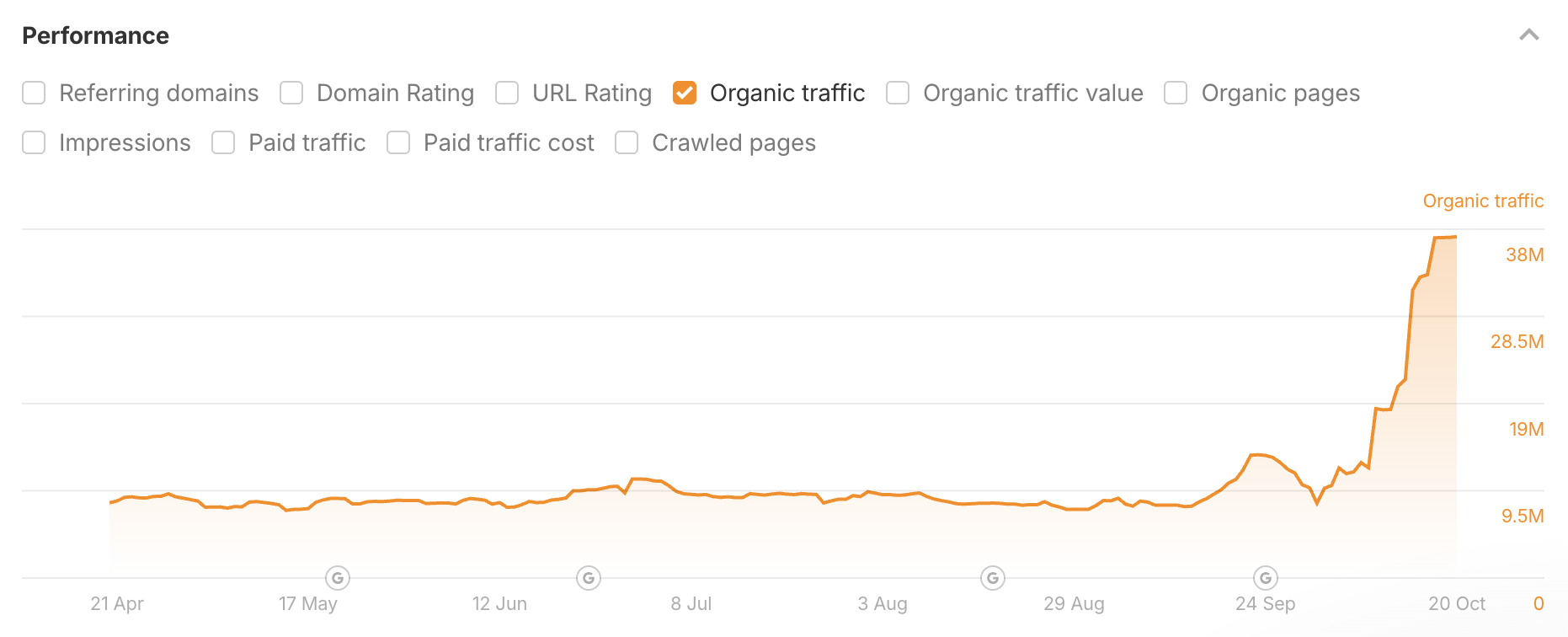
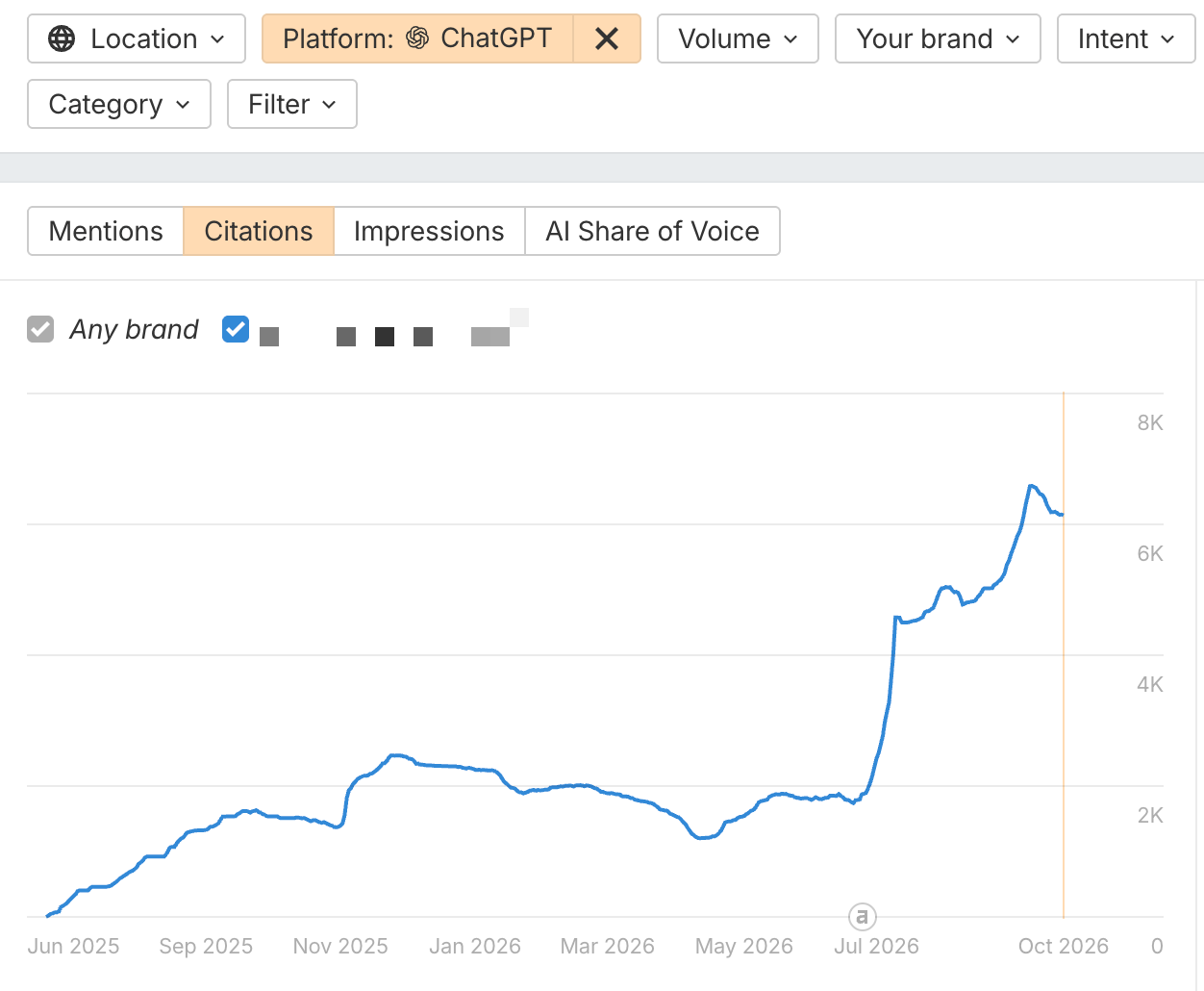
It doesn’t look good—but that’s the point. No one is supposed to look.
The goal of headless content is not to bring people to your website. Instead, it exists to help your brand get mentioned in AI answers, to help your domain appear as a cited source, to help influence business-critical narratives within generated responses, and avoid ceding important topics to your competitors. It plays by different rules. And that’s important, because AI summaries seem to be a permanent feature of search. The game has changed.
Maybe content created for machines is no longer such a bad thing. Maybe we are increasing the quality and outcomes associated with AI-generated responses. Maybe this is what high-performing content looks like, under the new paradigm Google has created.
The only wrong response is no response
I think we’re seeing a growing bifurcation in content marketing.
We’re moving away from the messy middle ground where search content was expected to appeal to both human readers and machine retrieval. More companies are embracing the reality that content optimized for AI search looks different from content optimized for human interaction.
There is no guarantee that this is a lasting strategy. Headless content marketing is useful because AI search engines rely—perhaps over-rely—on retrieval-augmented generation, rationalizing their answers by pulling relevant web pages from a search index.
But who’s to say that will remain the case? Google seems intent on stopping ChatGPT from scraping its SERPs, and it seems that AI search providers are already realizing how gameable RAG really is.
At the least, headless content is a logical response to the incentives Google and ChatGPT have created. The only strategy that is utterly wrong is to keep doing what we have always done, and fail to acknowledge that the fundamental unit economics of content marketing and search have changed.
Google already decapitated your search content. Headless content just stops pretending otherwise.
What It Is, How to Measure It, and What It Actually Tells You
As if we didn’t already have enough dashboards, we had to go and invent “AI share of voice”.
Sigh. Yet another metric marketers have to be raked over the coals for.
Jokes aside, AI share of voice can be useful. It tells you how visible your brand is in AI responses compared with your competitors.
But the number is only as meaningful as the way it’s calculated.
So in this guide, I’ll show you exactly what AI share of voice is, how it’s calculated, how to measure it in Brand Radar, and how not to read more into the number than it can tell you.
AI share of voice (AI SOV) is the share of AI visibility your brand captures compared with the competitors you track, across the prompts you care about.
How AI share of voice is calculated
A common way to calculate it is:
AI SOV = responses that mention your brand ÷ responses that mention any tracked brand × 100
Let’s say you track three prompts about email marketing software on ChatGPT, and compare your brand with two competitors. Here’s which brands each response mentions:
Every brand appears in two of the three responses, so each has 2 ÷ 3 = 67%.
But that treats every prompt equally, and “best email marketing software” is asked far more often than the ecommerce automation question. Appearing in that first answer puts you in front of many more people.
So in Brand Radar, we weight each prompt by AI-adjusted volume: the monthly Google search volume of the keyword behind the prompt, multiplied by a platform ratio. The ratio reflects how much traffic each AI platform sends to websites compared with Google organic search, based on Ahrefs’ traffic data.
For ChatGPT, it’s currently 0.115, so a 20,000-search keyword becomes 2,300 on ChatGPT.
When a response mentions your brand (or cites your website), that prompt’s AI-adjusted volume counts toward your estimated impressions. Your AI share of voice is your impressions divided by the impressions of all responses that mention any tracked brand (here, 2,300 + 920 + 115 = 3,335):
Same responses, same brands, but your share drops to 31% because your mentions come from the prompts people ask least. Impressions are a modeled estimate of exposure, not a count of people who saw an answer.
What about other AI platforms?
Each platform gets its own ratio, because people use them very differently: currently 0.115 for ChatGPT, 0.011 for Gemini, and 0.01 for Perplexity. So the same 20,000-search prompt carries 2,300 impressions on ChatGPT but only 220 on Gemini.
We calculate AI SOV per platform, and when you combine platforms, the overall score is a weighted average where platforms with more impressions count for more.
For example, let’s say the same prompts give you 28% AI SOV on ChatGPT and 11% on Gemini. Because ChatGPT carries roughly ten times the impressions, your combined score lands at about 26.5%, which hides the Gemini weakness almost completely.
So check each platform on its own before looking at the combined number.
Always report the scope
Every number above depends on choices: which prompts, platforms, and competitors you track, where, and when.
Change any of them and the percentage changes, which is also why two tools can report different AI SOV for the same brand without either being wrong.
- “Our AI SOV is 24%.”
- “Our AI SOV is 24% across 500 tracked prompts in ChatGPT and Gemini, against three named competitors, during August.”
Only the second tells you what the 24% actually refers to.
AI share of voice is useful when you want to answer questions like:
- Are we more or less visible than our competitors in AI responses?
- Is our relative visibility increasing over time?
- Which competitors appear most often for topics we care about?
- Are we more visible on one AI platform than another?
- Which groups of prompts are we weak or strong for?
For example, let’s say you track 200 prompts around “email marketing software.” Your brand has:
- 12% AI SOV overall
- 24% AI SOV on “best email marketing tools” prompts
- 5% AI SOV on “email automation” prompts
That tells you something useful: your brand is relatively visible for broad comparison prompts but weak around the specific sub-topic of automation. That’s a much better use of SOV than treating the overall 12% as the only number that matters, because it tells you where to act. Automation is the gap, so that’s where new content, comparison pages, and third-party mentions should go first.
Then you can track those prompts to see whether the gap closes.
But remember: visibility isn’t the same thing as outcomes. AI SOV doesn’t tell you whether mentions are positive, whether AI actually recommends you, whether you get traffic, or whether that traffic converts.
Brand Radar gives you two ways to measure AI visibility: explore our broad index of pre-collected AI responses, or track a focused set of prompts you choose yourself.
The broad index is available immediately. Tracked prompts start collecting data after you add them.
Whichever route you use, the result only makes sense when the brands, competitors, prompts, platforms, location, period, and dataset are clear.
1. Add your brand and competitors
Open Brand Radar, enter your website, and click Analyze.
We’ll suggest your brand and commonly associated competitors. Review those suggestions rather than accepting them blindly.
If you want full control, choose Add your brand and competitors manually.
For each entity, add the main brand name, genuine name variations, and the associated website or websites. You can group several names and sites into one entity, which is useful for rebrands, abbreviations, or product names that should count together.
2. Use the broad index for immediate discovery
When you click Explore, we do not generate a new batch of AI responses for your brand.
We search our existing corpus of responses collected from search-backed prompts, match your brand and competitor entities, and calculate the report from that data.
That is why the results appear immediately. Brand Radar can populate AI responses, mentions, citations, cited domains and pages, estimated impressions, and AI Share of Voice without waiting for a new collection run.
In this view, AI Share of Voice represents the brand’s share of estimated impressions within the filtered Brand Radar corpus, relative to the competitor entities you are tracking.
3. Define your market and platform scope
Use the report filters to define the scope you actually want to describe. Depending on the question, that may include:
- country or location (e.g. United Kingdom, or London)
- AI platform (e.g. ChatGPT, or Gemini)
- topic, query, or response terms (e.g. only prompts about “email automation”, or only responses that mention “pricing”)
- date or reporting period (e.g. last 30 days, or a single month such as August 2026)
- Dataset (e.g. Ahrefs prompts from our broad index, your Tracked prompts, or both)
Platform selection matters because the same brand can perform very differently across ChatGPT, Gemini, Perplexity, Copilot, Google AI Overviews, and Google AI Mode.
For example, let’s say the same measurement set produces 28% AI SOV on ChatGPT and 11% on Gemini. If you only looked at ChatGPT, you might conclude your visibility was strong. If you only looked at the combined result, you could miss the platform-level weakness.
In Brand Radar, you can filter by AI platform and inspect the underlying responses behind the score.
4. Create a saved report
If you want to revisit the same setup, click Save report in the sidebar, followed by Create report. The saved report preserves your entities, filters, and location.
To use Tracked prompts, map the report to one of your Ahrefs projects. Choose carefully: once a report is mapped to a project, you can’t switch it to a different one.
In Report settings, you can also review your brand, competitors, market or niche, location, filters, report name, AI assistants, and tracking frequency.
5. Build your own prompt set
The broad index is useful for discovery across our existing response corpus. Tracked prompts are better when you want to monitor a smaller set of commercially important questions.
Click Track custom prompts, add one prompt per line, choose one or more locations, and review the estimated checks before clicking Add prompts. Set which AI assistants should run the prompts and whether they should update daily, weekly, or monthly.
One check equals one prompt execution on one AI assistant in one location. For example, five prompts checked on three assistants in two locations use 30 checks each time the set runs.
You can also use Generate to suggest prompts from your brands and focus areas. Treat those suggestions as a starting point. Edit them and keep only the questions that represent what your customers actually care about.
Useful prompt groups may include:
- high-value product categories;
- problems customers are trying to solve;
- comparison questions;
- use cases;
- branded and non-branded questions.
AI responses vary, so groups of relevant prompts are usually more useful than individual answers.
6. Understand the metrics
The Overview report shows mentions, citations, estimated impressions, and AI Share of Voice side by side.
They answer different questions.
- A mention is counted once when a brand appears at least once in an AI response.
- A citation is counted when a page appears as a cited source in an AI response.
- Estimated impressions sum the AI-adjusted volume of prompts whose responses mention the brand.
- AI Share of Voice compares those impressions with the other tracked brand entities. Across several platforms, the overall result is impression-weighted.
From the Overview, open AI responses, Cited domains, or Cited pages to see the actual answers that mention each brand, the websites AI cites most often, and the specific pages it links to.
A brand can be mentioned without its website being cited, and a page can be cited without the brand being recommended.
7. Keep the measurement consistent
Once you have a setup you trust, stop changing it every five minutes. The moment you make any changes, you’re no longer making a like-for-like comparison.
For example, let’s say your AI SOV is:
But then you realize that in July you:
- removed your biggest competitor;
- added 50 prompts where your brand already performs well;
- dropped one platform where you were weak.
That 8-point increase no longer tells you much about whether your actual visibility improved. You improved the report. But not your visibility.
Return to the same saved report for each comparison. Once Tracked prompts have data, use the Dataset filter to view Ahrefs prompts, Tracked prompts, or both. For reporting, it is usually clearer to keep broad-index findings and Tracked-prompt trends separate.
Whenever you report the result, record the brands, aliases, competitors, market, location, platforms, dataset, prompt group, tracking frequency, and date range alongside it. That makes the number reproducible and much harder to misread.
There isn’t a universally good AI share-of-voice score.
Think about it: If you compete against one other brand, 20% SOV means something very different than if you compete against nine brands.
Likewise, 20% from one prompt set isn’t automatically comparable with 20% from another tool using a different methodology.
Always ask what 20% is relative to. But relative to what? There are three comparisons I’d pay attention to.
Compare against your competitors
There’s no way to know what that means.
Now add the competitor data:
Now the number tells a story.
You’re behind two competitors, but only slightly ahead of one.
That gives you a much more useful benchmark than some generic “20% is good” rule.
Compare against yourself
Suppose your SOV looks like this:
- January: 14%
- February: 17%
- March: 21%
- April: 22%
If the prompt set, platforms, competitors, and methodology stayed roughly the same, that trend is potentially meaningful.
Now compare that with this:
- January: 14%
- February: 17%
- March: 35%
and in March you removed your two biggest competitors.
That trend is much less useful.
Use industry benchmarks carefully
Suppose an industry report says the average AI SOV in your category is 25%. Your score is 18%.
- Did the study track the same AI platforms?
- Did it use similar prompts?
- Did it include the same number and type of competitors?
- Did it use the same formula?
- Was the data collected during a comparable period?
If the answer is “no” to most of those, the 25% benchmark may not tell you much.
Otherwise you’re comparing two percentages that happen to have the same symbol after them.
You checked your report last month: 20%. This month: 27%. Before you pop the champagne, work out which of three things moved it.
1. Your visibility genuinely changed
You tracked the same prompts, competitors, and platforms in both months, and your brand now appears in 95 of 300 responses instead of 60.
Because the setup didn’t change, that’s strong evidence your visibility genuinely improved. Maybe new content started getting picked up, or competitors lost ground.
2. You changed the measurement
If you added prompts, removed a competitor, or dropped a platform in between, you’re not making a like-for-like comparison (see step 7 above).
You changed the ruler, not your visibility. Document every scope change so you can tell the difference later.
3. The AI systems changed
Let’s say you track the prompt “What are the best SEO tools for a startup?” One week, ChatGPT says, “Ahrefs, Semrush, and Ubersuggest are strong options.” The next week, with no change to your setup, it says, “Semrush, Moz, and SE Ranking are worth considering.”
That doesn’t mean your SEO got worse in seven days. The model may have been updated, its retrieval may have pulled different sources, or the answer may simply have varied between runs.
Across hundreds of prompts, that noise adds up, so trust trends that persist across several reporting periods rather than one-off spikes.
Final thoughts
AI share of voice will probably get more useful as AI search matures.
We’ll get better data, better sampling, better ways to estimate demand, and better ways to separate a passing mention from meaningful visibility.
But I don’t think the core problem will change.
The number will still depend on what you chose to measure.
So the real advantage won’t come from obsessing over who has 22% versus 24% SOV this week. It’ll come from building a measurement setup you trust, watching how it changes over time, and understanding why it changed.
That’s where AI share of voice becomes genuinely useful.
Not as another score to chase, but as an actual way to understand how your brand’s position in AI responses is evolving.
If you want to see where you stand, track important prompts, and check your AI share of voice, sign up for Brand Radar today.
Moz & Profound Partner to Connect SEO and AI Visibility
As new AI engines continue to emerge and search behaviors evolve rapidly, the need to understand how people discover and engage with brands remains fundamental to success. Also unchanged is the foundation on which the search industry as a whole was built.
Core SEO concepts — from links to keywords to on-page optimization — are critical in AI and traditional search alike, and we take pride in our long history as the industry’s trusted choice across every part of the practice.
That’s why we’re excited to announce a new strategic partnership that brings Moz’s deep search intelligence data directly into Profound.
As the leading AI marketing platform, Profound’s innovative approach to AEO requires high-quality SEO metrics and insights, and we’re delighted to be the ones to deliver this data where their customers need it most, right inside the Profound app.
This unique opportunity brings together one of the most experienced teams in SEO data with one of the newest and most dynamic teams in AI search, and reflects a shared commitment to helping marketers adapt to industry shifts with greater clarity and certainty.
From Prompts to Priorities: A Practical AI Visibility Workflow
Studying the data is only half the job. Most reports end up in purgatory because they never tell the team what to do next. The typical report barely explains what happened, adds multiple fancy-looking charts, and quietly expires in a shared folder after a 30-second executive review. Your AI Visibility report should finish with a short list of work the team can actually start.
Turn each verified finding into one of four types of work:
- Fix the facts: Correct any obsolete information on both owned pages and the third-party sources from the citations report.
- Earn consideration: Craft pitches for your brand to be mentioned on cited pages where competitors are featured, and you’re not.
- Protect a strength: Keep the supporting claims and pages accurate and current.
- Keep digging: Investigate when product fit, prompt value, or source evidence remains murky.
Not every finding deserves its own project. Some patterns can turn into work that actually moves revenue; other tasks may be intriguing but not worth pursuing. To prioritize effectively, use this checklist:
- Assess business impact
- Consider the frequency with which the pattern appears.
- Evaluate your confidence in the supporting evidence.
- Estimate the effort required.
Pick three to five priorities based on these criteria. Don’t mark every potential task as a high priority unless you want to stress out your colleagues and burn the midnight oil with your project management system.
Assign each project an owner, a concrete deliverable, a supporting prompt or URL, a review date, and a status. For most teams, a shared spreadsheet is enough; larger teams can move the work into their existing project management system.
One last rule: don’t keep moving the goalposts. Preserve the existing prompts, exports, topics, cited pages, and collection settings. Compare the same scope next time and report any new prompts separately. Otherwise, you can manufacture a dramatic increase in brand visibility simply by changing what you track.
For example, let’s say you want to pivot your brand visibility dashboard to track only comparison prompts against competitors, using only branded terms. Your next collection may reflect a notable increase in brand visibility, but that’s because you guided the system to mention your brand name in every single prompt. Based on your original business objective, you may want to track non-branded prompts to gauge better whether LLMs recommend your products without being prompted by the brand name. On the other hand, a large number of branded prompts can give you more evidence to collect intel on how your brand is perceived across the web.
How to Automate Content Creation: A Follow-Along Guide
Automated content creation is the use of software or AI to complete a repeatable sequence of content-production tasks.
When people hear “automated content creation”, I imagine they picture something like this: Enter a keyword, click a button, and poof! An article is made. From there, they’ll generate 500 articles before the day ends and publish all of them.
I don’t want to say these systems don’t exist. They do. In fact, we’ve even made one. But our content cadence has remained the same.
Because it’s not our goal at Ahrefs to contribute even more spam and slop to the Internet.
Yes, we want to make more content. But we want to make more useful content. More better content. Not simply more content.
Automation can help: not by replacing the interesting parts of content marketing, but by freeing us from the boring ones.
Because I love making content that helps people and promotes our brand. But let’s be real: Not every part of content marketing is equally enjoyable. Some parts are really, really, really boring. Unfortunately, they’re also important.
Google loves fresh content. When its Query Deserves Freshness (QDF) algorithm detects that a topic needs current information, it boosts recently updated pages. Likewise for AI assistants. Our study found that compared to traditional search results, AI assistants prefer citing fresher content.
Updating is easy enough when you have one article. Not so easy when you have dozens. Or hundreds.
So I built something I call the Data Refresh Hub.
- Pulls fresh data for 12 datasets
- Removes NSFW results and makes sure it fits the category (e.g., questions for “top Google questions”)
- Rebuilds the relevant tables and charts
- Updates our WordPress drafts
- Emails me when it’s finished
- Waits for me to review everything before anything gets published
In other words, the machine now does most of the boring work.
This guide will show you how I built it and, more importantly, how you can apply the same process to the annoying content tasks you wish would disappear from your own to-do list.
What you’ll need to follow along
If you want to build your own automation while reading this guide, you’ll need a few things:
- One content job you already perform repeatedly, like my monthly updates of “top Google searches”
- An example of a finished result you consider good, e.g., the data tables in “top Google searches”
- Access to the information needed to produce it, e.g., Keywords Explorer
- Somewhere to send the finished draft, e.g., WordPress
- An AI agent or automation tool capable of connecting everything together, e.g., Letaido
Don’t worry if you don’t have all of these yet. Part of this guide is figuring them out.
You will, however, need to decide which AI agent or automation platform you want to use.
I chose Letaido because it had everything I needed in one place:
- Complete access to Ahrefs data
- Ability to switch between models (e.g., Opus 5.5, GPT-Sol 5.6, GPT-Sol 6)
- Workflows that could be shared with the rest of the team (if the automation was successful, then others in the team could potentially use it too)
- Complicated developer stuff like hosting and secrets handled for me
- Connectors to platforms like WordPress
The last point was important for me because I didn’t want to build an automation that did 90% of the work, only for me to spend the final 10% copying tables from one tool and pasting them into WordPress every month. Which defeats the purpose.
You can, of course, use your favorite agent instead. Claude Code, Codex, or whatever else you prefer.
You may just have to do some extra work connecting MCPs, WordPress, databases, or whatever other systems your workflow depends on.
1. Choose one repeatable content job
Don’t start by asking: How can we use AI?
I think this is where a lot of companies go wrong. The question is so open-ended that you end up staring into an infinite universe of possibilities. And when there are infinite possibilities, people don’t necessarily dream bigger.
Then they go back to whatever they were already doing. Instead, start with your biggest existing frustration.
What is something you already have to do that you wish you didn’t?
If nothing immediately comes to mind, list the work that happens every week, month, quarter, or every time a piece of content gets produced.
Then look for tasks that are:
- Repetitive, e.g., you have to do it every day, week, or month
- Time-consuming, e.g., it takes more time than you expect each time
- Governed by reasonably stable rules, e.g., keyword research, where the process is mostly the same no matter the industry
- Valuable when done correctly, e.g., it has business potential
- Frequently delayed, rushed, or skipped, e.g., it takes more time than usual so you procrastinate
For me, one obvious candidate was updating our data-driven articles.
These articles were most useful when the numbers were current. They also tended to get the most search traffic when we updated them.
But every refresh required me to:
- Pull new data from multiple places
- Remove irrelevant results
- Check the figures for mistakes
- Build new tables and charts
- Rewrite parts of the post if something important had changed
- Change titles or subheadings where necessary
- Update the publication date
If I had one article, this would have been fine. But the collection kept growing.
Eventually, updating everything monthly became unsustainable. So we compromised and moved to quarterly updates, even though monthly would have been better for readers.
2. Write down exactly how you make it
An agent cannot reliably automate a process that nobody can explain.
This sounds obvious. It isn’t. Most of us do repeat tasks on autopilot, and autopilot is terrible at explaining itself.
So before you build anything, reconstruct how you actually do the job. I don’t mean how you think you do it, or how it’s written in an SOP nobody has opened in years. I mean how you really do it, including the shortcuts.
Record every meaningful action. That includes the small things and the corrections that are easy to forget.
Here’s roughly what my process for updating Top Google Searches looked like once I wrote it all down:
- Go to Keywords Explorer and do an empty search with the country filter set to the U.S.
- Download the CSV for the top 200 keywords
- Open the CSV, check the list, and remove anything that doesn’t seem right (e.g., NSFW queries)
- Spot-check the top results against last month’s to catch anything that looks off
- Round all numbers up to the nearest 10,000.
- Copy-paste the data into TablePress, the plugin that hosts all our tables
- Make sure nothing went awry
- Go to an internal tool and pull the queries for top global Google searches
- Rinse and repeat the above process for these set of keywords
- Check whether the changes are big enough to warrant rewriting the intro or subheadings
- Make sure all images in the blog post are up-to-date
- Update the “last updated” date
As you can see, there are a lot of little decisions here and there that you likely won’t remember off the top of your head because it comes so naturally to you. Writing them down is how you find them.
A pro tip I can give you is to ask the agent to interview you.
I want to automate [task]. Interview me about how I currently do it, one question at a time. Whenever my answer is vague or I say "usually," "it depends," or "I just know," ask a follow-up question. At the end, write up the full process as a step-by-step checklist, including every rule and exception I mentioned.You’ll probably discover you have a lot more unwritten rules than you thought.
Once you have that checklist, don’t leave it sitting in a doc. Turn it into a skill file: a saved set of instructions your agent follows every time it runs the job, so you write the process down once and never have to re-explain it. I’ve covered how to build one in our guide to Claude Skills.
3. Give the system the information it needs
I wouldn’t rely on an LLM’s memory or generic web search for information that matters to your workflow.
LLMs are known to make up numbers and web search tends to pull from whatever it finds. That could be a listicle from five years ago or even AI slop. Hardly worth trusting.
You want to tell the LLM which sources it should use. Then connect those sources to it, whether through an MCP, an API, or uploaded files.
Depending on what you’re creating, that might include:
- First-party data, e.g., data generated by your company or from your products
- APIs, e.g., connections to other tools or data sources you use
- Product documentation, e.g., your internal product documentation or help centre
- Customer interviews
- Approved research, e.g., your company only cites or quotes from reputable sources or academic journals
- Existing articles, e.g., your blog or YouTube channel
- Search data, e.g., data from Ahrefs
- Editorial guidelines
Connect your agent to Ahrefs with the Ahrefs MCP
If your workflow runs on search data, the Ahrefs MCP server lets Claude, ChatGPT, Copilot, and other AI tools pull live data straight from your Ahrefs account. It’s hosted by Ahrefs, so there’s nothing to install.
Connect your account and your agent can query Keywords Explorer, Site Explorer, and more from the chat.
For my Data Refresh Hub, different articles require different sources. Here’s where everything came from:
The rule of thumb: the LLM’s job is to process the data, not to be the data.
4. Show it what good and bad look like
Instructions are useful. Examples are better.
If your workflow involves judgment calls, give the system examples of:
- Things you would accept
- Things you would reject
- Why you made each decision
- Ambiguous cases that should go to a human
Your goal is to turn recurring editorial decisions into explicit rules.
For example, Top Google Questions is supposed to be a list of, well, questions. The simplest rule would be “keep anything that starts with who, what, where, when, why, or how.”
Sounds simple. Except lots of queries start with a question word and aren’t questions at all:
- How to Train Your Dragon: a movie
- How I Met Your Mother: a TV series
- Would you rather questions: a category of questions, not a question
Sometimes the LLM won’t catch these right away. It sees “how” at the start and a sensible-looking phrase after it. A human (me) needs to tell it explicitly why these shouldn’t be accepted.
Fortunately for me, Letaido was capable enough to spot it:
This is where the reasons matter. If I only say “reject How to Train Your Dragon,” the model learns one exception. If I say “reject titles of movies, TV shows, books, and songs, even when they’re phrased as questions,” it learns a rule. Now it can also catch something like How to Lose a Guy in 10 Days without me ever mentioning it.
Most Searched People had a different problem.
This one was harder, because we don’t have that data in Ahrefs. There’s no ready-made list of “people” to pull from. So I needed the LLM to analyze the data we do have and pull out the entities that belong to a person.
That’s harder than it sounds. Is “Jordan” a basketball player, a country, or a pair of sneakers? Should “Taylor Swift tickets” count toward Taylor Swift?
Use Ahrefs’ entity filters for ambiguous names
Telling a person apart from a product or a place is exactly what our entity filters are built for. In Brand Radar, you can match a brand as an entity instead of plain text, so “Apple” the company isn’t lumped in with apples the fruit.
Each term can be set to Entity is, Entity contains, or Text, with optional Company or Product filters.
I decided in the end that only name searches should count.
Finally, whatever you do, make the system keep what it rejected, not just what it accepted, along with the reason.
You can see here that the system has already wrongly rejected certain queries that are real questions. That’s the process working. So I can now go in and make sure the LLM doesn’t do this again.
That rejected list is your early warning system. If a genuine question ever ends up in there, you’ll spot it in seconds and fix the rule. If you only see the final output, you’ll never know what went missing.
5. Make one piece from start to finish
At this point, it’s tempting to automate everything. Don’t.
Always start with one thing first.
For example, I made sure the automation worked perfectly for Top Google Searches before I even thought about expanding it to everything else.
It’s tempting to go big. You’ve done all this prep, the agent seems smart, why not point it at all 12 datasets at once?
There’s a very practical reason for this: You want to catch all its mistakes before anything goes live. And it’s a lot easier to catch mistakes in one output than in 12. If all 12 are wrong, you don’t even know where to start looking.
Starting small also lets you gradually define what the system is and isn’t allowed to change.
For example, I originally only wanted the tables changed.
Nothing else. Because I was afraid that if I asked the agent to improve the article, it’ll make a mess. Em dashes, AI-isms, and the like.
Once I was satisfied with what it did (and not immediately, over the course of 2-3 months), I then started to allow it to make bigger changes.
For example, the first line in this intro is now “programmatic”, in the sense that it’ll change according to what the top searches are in the table.
Another example: This image also generates each time the table is updated (across all the different posts for the different platforms):
I’ve started playing around with how to improve the tables to have more interesting data and also help the reader:
I also recommend generating an output at every major stage of the workflow.
This setup has saved me more times than I can count. If there’s a mistake, I don’t have to restart the whole thing from the top. I check each output, find the stage where things went wrong, fix it, and rerun from there.
Ideally, it should also keep all the data it has changed or updated over time. Mine does. That means I’m building a historical dataset every month. In the future, I can use it to make charts and sparklines that show how searches change over time. That’s content nobody else can make, because nobody else has the data.
Finally, the one rule for myself: I never let AI publish automatically for me.
However good the automation gets, we need a human in the loop to keep an eye on things, just in case anything goes wrong. And eventually, something always does.
More than that, someone needs to be responsible for what goes live.
I think of it like being the head chef at a world-class restaurant.
The head chef may not personally cook every single dish anymore. They have sous chefs, line cooks, pastry chefs, and an entire team doing the work.
But everything that leaves the kitchen goes out under their name. If a customer gets a bad plate, it’s the head chef’s reputation on the line. So they check every dish before it’s served.
Your automation is your kitchen. You’re the head chef now. Nothing should leave without your sign-off.
6. Run it for real, then put it on a schedule
Once your one piece works in testing, run the whole thing for real, from start to finish, exactly as it would run on its own.
Then compare the output with your human-made version, side by side. Here’s what I’d check:
- Numbers: Spot-check a handful against the source. Are they correct?
- Rejections: Scan the rejected list. Did anything good get thrown out?
- Formatting: Does it match the rest of the article and your house style?
- Rewritten text: If it touched the intro or headings, does it still sound like you?
- Links, dates, and small stuff: The things readers notice immediately when they’re wrong.
Keep this question in mind: Would I have published this if I’d made it myself?
When everything looks good, set up a schedule (e.g., monthly).
A couple of things to think about here:
- Timing. Schedule it after your data sources refresh. Otherwise, you’ll get a beautifully formatted update of last month’s data.
- Failure alerts. Make sure it tells you when something goes wrong, not just when it’s done. The worst kind of failure is the silent one, where the automation quietly doesn’t run and nobody notices for three months.
7. Scale it up
When you’re happy with the workflow, it’s time to expand it.
That’s what I did. Once I was happy with everything coming out of Top Google Searches, I rolled it out across all the other posts I wanted to update, one at a time.
Yes, it takes a while. Each new article has its own quirks. Most Searched People needed completely different rules from Most Expensive Keywords. But remember: it’s easier to fix one thing than everything at once. And every article you add gets easier, because most of the pipeline is already built.
But in my case, I didn’t just scale up my own workflow. I shared the process with the team, and it inspired them to build things too.
So “scaling it up” doesn’t just mean scaling your own processes. It can mean scaling it across your entire department, or even the entire company.
That’s how true AI adoption happens. Not by sending a company-wide memo saying “use AI more.” That just produces anxiety and a lot of ChatGPT tabs. It happens when someone builds something that works, shows it to their colleagues, and they go: “Wait, can I do that for my thing too?”
What still goes wrong with my workflow
So is it over once you’ve set up the automation? Can you finally be in Bali sipping cocktails while AI does all your work?
Unfortunately, no. The last I checked, I’m still in London.
Human review is still necessary. And because AI keeps changing and improving, your automations will break.
If a popular, well-maintained plugin can break overnight, your homemade automation definitely can.
Here’s my own personal example: I built my automation in the same workspace as our content team. Ryan added a new secret or bridge for their own workflows, but unknowingly broke my automation.
Here are the things most likely to go wrong:
- Model updates. A new model version can interpret the same instructions differently. Rules that worked last month might suddenly be ignored, or followed a little too literally.
- Source changes. APIs change, data formats shift, and an export you relied on gets a new column.
- Weird data. A news event can send a random keyword to the top of the charts overnight. Your automation will happily report it unless you’ve told it to flag unusual spikes.
- Rule drift. The world changes. A new movie comes out with a question for a title, and your rules don’t cover it yet.
- Formatting breaks. A CMS update, a theme change, or a new block type, and suddenly your tables look like they were built in 1998.
So you’ll have to keep on maintaining your automations and making sure everything continues to work well.
Again, back to the same restaurant analogy: Even as a chef climbs the ranks, they don’t stop checking in on their sous chefs and junior chefs. Recipes get tweaked, suppliers change, new staff join. So they keep tasting, keep checking, and keep correcting, so every dish on the menu comes out perfect.
Same with your automations.
Final thoughts
I think the least useful way to approach automated content creation is to ask how AI can make as much content as possible.
We already have enough content.
What parts of making genuinely useful content are stopping us from doing more of it?
Get AI to handle the boring parts, so you can spend your time on the parts that actually need you: the ideas, the opinions, the experience, the taste. The stuff no model can fake.
That should be the future of working together with AI on content.
